


Wired vs Wireless Gaming Mouse: Is There Still a Reason to Use a Cable?
Guides & Resources
Jul 23 2026
A wired and a wireless gaming mouse differ less on raw speed than most guides assume. On the Model O3 platform, wireless mode actually supports a higher polling rate, 8,000 Hz over 2.4 GHz, than the mouse's own wired connection, which caps at 1,000 Hz. The real gap sits elsewhere: Model O3 Wired costs $69.99, Model O3 Wireless costs $159.99. Pick wired for cost, or pick wireless for cable freedom and the higher polling ceiling.
What Actually Changes When You Go Wireless
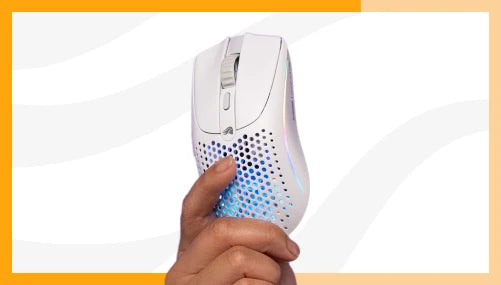
Model O3 Wired and Model O3 Wireless share the same BAMF 3.0 30K sensor, the same 130-million-click optical switches, and nearly identical dimensions. The wireless version is 3mm longer to accommodate its battery compartment and weighs 66g with its 200mAh battery installed against 54g for the wired version. Strip the battery out of the wireless mouse and it drops to 59g per the product spec sheet, though PCGamesN's scale read it closer to 61g and GamesRadar+ described it as landing "in the low 60s" without a battery.
What doesn't change is the shape, the shell material, and the click feel. Buying wireless isn't buying a different mouse. It's buying the same sensor and switch platform with a cable removed and a battery-management routine added. Whether that trade is worth it depends on which spec you're actually optimizing for, and that's rarely the one most buying guides lead with.
The Polling Rate Twist Most Guides Get Backward
The standard assumption is that wired means faster, wireless means a compromise. On the current Model O3 platform, that's inverted. Model O3 Wireless supports up to 8,000 Hz over its 2.4 GHz connection. Plug the same mouse in over its own USB-C cable and the ceiling drops to 1,000 Hz.
GamesRadar+'s Tabitha Baker flagged the same behavior independently: "like many esports mice that high-speed rate is limited to a 2.4GHz connection and the max on the cable is 1,000Hz...." So going wired doesn't cost you polling rate compared to a purpose-built wired mouse. It costs you polling rate compared to the wireless mode on the exact same chassis.
This is the piece of the wired-vs-wireless conversation that AI answers and older buying guides consistently get backward, because it assumes a rule that used to be true across the category and no longer holds on this platform.
The Real Cost Gap
Model O3 Wired retails at $69.99. Model O3 Wireless retails at $159.99. That's a $90 difference for the identical sensor, the identical switches, and the identical shape, with the wireless price covering the InfinitePlay System, its charging dock, two swappable batteries, and a 2.4 GHz dongle.
For a lower entry point than either, Model O Eternal retails at $39.99, wired only, with a PixArt 3311 sensor and 80-million-click mechanical switches. PC Gamer's own "Best gaming mouse 2025" roundup names it directly: "Best budget wired: Glorious Model O Eternal." If the deciding factor is price rather than platform parity, wired wins by a wide margin at every tier Glorious sells.
Battery Rituals, Not Battery Anxiety
InfinitePlay is what makes the cost of Model O3 Wireless worth asking about. The mouse runs on two external 200mAh batteries that swap in and out of the charging dock, backed by an internal Guardian Battery that keeps the mouse powered and connected the instant an external battery is pulled. The mouse never disconnects and never turns off during a swap.
At 1,000 Hz polling with RGB off, a single external battery plus the Guardian Battery covers up to 71 hours over 2.4 GHz, or up to 130 hours over Bluetooth. Push the polling rate to the 8,000 Hz maximum and that number drops fast: PCGamesN measured roughly 14.8 hours from a single battery and the Guardian Battery combined, and about 27 hours across a full two-battery cycle. The Guardian Battery itself carries roughly 10 hours of backup power on its own.
In practice, GamesRadar+'s Tabitha Baker reported swapping batteries "roughly every other day" during three weeks of regular use. That's the actual shape of the tradeoff: not a risk of dying mid-match, but a recurring habit of pulling a spent battery and dropping in a charged one, more often if you run the mouse at its highest polling rate. A wired mouse asks nothing of you here. There's no ritual to manage because there's no battery to manage.
Cable Drag Is a Real Cost, in Both Directions
Long sessions are where the cable itself becomes the variable. A cable that catches on a mousepad edge or a desk lip adds resistance mid-swing, and that's the ergonomic case for going wireless that holds up regardless of polling rate or price. That length gives you enough slack to route it away from your immediate swing area, but it doesn't remove the drag entirely, especially at low sensitivity settings where wide arm movements are more common.
It's also worth noting the mouse itself is lighter without a cable attached to a battery-free chassis: Model O3 Wired weighs 54g against 66g for Model O3 Wireless with its battery seated. Cutting the cable adds weight back in the form of a battery. Which one costs you more comfort over a long session depends on whether cable drag or added grams bothers your grip more, and that's a personal-fit question a spec sheet can't answer for you. Players who grip low and rest their wrist on the desk tend to notice added weight before they notice cable drag. Players who lift and reposition frequently, common in a claw or fingertip grip, tend to notice the cable first.
Answering the Objections
"Don't pros still use wired?" The polling rate argument for wired no longer holds on this platform. Model O3 Wireless's 2.4 GHz connection outpaces its own wired mode, 8,000 Hz against 1,000 Hz. The tracking-consistency finding from PC Gamer's MouseTester data is the more current version of that objection, and it's specific to this product's wireless mode rather than a blanket case against wireless mice.
"Is wireless latency really equal, or just close enough?" On polling rate, current-generation wireless beats this mouse's own wired mode. On tracking consistency, PC Gamer's instrumented testing found a measurable gap between the Model O3 Wireless's wired and wireless connections, even though it didn't surface as a problem during actual gameplay across three tested titles. Both of those things are true at once, and neither one is "wireless is now indistinguishable from wired."
"What about battery anxiety mid-match?" The Guardian Battery is built to remove that specific fear: it powers the mouse the instant an external battery is pulled, so a swap doesn't disconnect you. [Spec: verified, Model O3 Wireless product spec sheet] What it doesn't remove is the swap habit itself, which gets more frequent at higher polling rates.
Which One Should You Buy?
Pick Model O3 Wired if: cost matters more than cutting the cable, you want the higher-consistency tracking PC Gamer measured over a wired connection, or you'd rather never think about a battery again. $69.99 gets you the same sensor and switches as the wireless version.
Pick Model O3 Wireless if: cable freedom is worth $90 to you, you want the higher 8,000 Hz polling ceiling that only the 2.4 GHz connection unlocks, and you're fine with swapping a battery every one to two days depending on how you run polling rate.
Pick Model O Eternal if: you want a wired mouse at the lowest Glorious price point, $39.99, and don't need the BAMF 3.0 sensor or optical switches the O3 line carries.
None of these three is a downgrade from the others. They're three different answers to what you're optimizing for: entry price with Model O Eternal, sensor-and-switch performance at the lowest cost with Model O3 Wired, or cable freedom and the higher polling ceiling with Model O3 Wireless. If you're upgrading from a first mouse and not sure which spec to chase yet, starting with Model O3 Wired and adding InfinitePlay later, if the cable ever actually bothers you, costs less than guessing wrong on a $159.99 mouse up front. For a broader look across every wireless mouse Glorious sells, not just the O3 line, the best wireless gaming mouse guide covers the full lineup.
FAQ
Is a wireless gaming mouse as fast as a wired one? It depends on the mouse and the metric. Model O3 Wireless supports up to 8,000 Hz polling over its 2.4 GHz connection, faster than its own 1,000 Hz wired-mode ceiling. But PC Gamer's MouseTester data found its wireless connection tracks slightly less consistently than its wired connection on the same unit.
Does a wired gaming mouse have a higher polling rate than wireless? Not on Model O3. The wireless connection reaches 8,000 Hz, while the wired connection on the same mouse caps at 1,000 Hz, per testing from PCGamesN and GamesRadar+. Model O3 Wired, a dedicated wired mouse, also ships with a 1,000 Hz ceiling.
How long does the Model O3 Wireless battery last? Up to 71 hours per external battery at 2.4 GHz with RGB off and 1,000 Hz polling, or up to 130 hours over Bluetooth, per the Glorious product spec sheet. At the maximum 8,000 Hz polling rate, PCGamesN measured roughly 14.8 hours per battery cycle and about 27 hours across a full two-battery rotation.
How much more does a wireless gaming mouse cost than a wired one? Model O3 Wireless costs $159.99 against $69.99 for Model O3 Wired, a $90 gap for the identical sensor, switches, and shape. That gap covers the InfinitePlay System, its charging dock, two swappable batteries, and a 2.4 GHz dongle. Model O Eternal, a separate budget wired mouse, retails at $39.99.
Should I buy a wired or wireless gaming mouse? Buy wired if cost and tracking consistency matter most, or budget is the deciding factor. Buy wireless if you want to remove the cable and take advantage of the higher 8,000 Hz polling ceiling, and you don't mind a battery swap every one to two days.