


How to Choose a Gaming Mouse: The 5-Question Framework
Guides & Resources
Jun 30 2026
To choose a gaming mouse, answer five questions in this order: What is your grip style? How big are your hands? What games do you play? Do you need wireless? What is your budget? Grip style is the most consequential decision - get it wrong and no sensor spec or polling rate will make the mouse feel right. The rest of the questions narrow the field from there. For a deeper look at the full mouse market before you buy, the gaming mouse buying guide covers every major spec category.
Question 1: What Is Your Grip Style?
Grip style filters out more of the market than any other variable. Three styles exist: palm, claw, and fingertip.
Palm grip. The entire palm rests on the mouse. Fingers lie flat across the buttons. This requires a longer, taller mouse body with a well-defined rear hump. Palm grip suits a heavier, more stable form factor because the whole hand guides the movement.
Claw grip. The palm heel rests on the rear of the mouse, but the fingers arch upward and contact the buttons near the tips. This needs a mouse with a clear arch at the rear third of the body - a shape that cradles the heel without forcing the knuckles flat.
Fingertip grip. Only the fingertips touch the mouse. No palm contact at all. This style demands a lighter mouse and benefits from a smaller, flatter profile. At this grip style, every gram is felt.
Most buyers do not know their grip style without testing. A practical test: rest your hand flat on a desk, then relax it into the shape it would take around a mouse. If your palm stays in full contact - palm grip. If your knuckles arc upward while your palm heel stays low - claw grip. If your fingers fully extend and only the tips curve downward - fingertip. Most buyers identify within about 10 seconds. Knowing which camp you fall into eliminates a significant slice of the market before you read a single spec. For a detailed breakdown of how grip style maps to mouse shape, the ergonomic vs ambidextrous gaming mouse guide covers the full picture.
Question 2: How Big Are Your Hands?
Hand size determines whether a mouse that looks right in photos will feel right in use. The measurement that matters is hand length: the distance from the base of your palm to the tip of your middle finger.
Under 17cm: a shorter form factor typically fits better - a body length in the 118mm to 122mm range.
17cm to 19cm: the range most medium mice are designed around. The Model O Eternal Wired, at 128mm in length, sits in this range.
Above 19cm: larger mice in the 130mm-plus range typically suit better, though grip style interacts with this - a large-handed claw gripper may still prefer a medium-length mouse.
Question 3: What Games Do You Play?
Genre should influence your sensor and button priority - not the mouse's marketing position.
FPS and competitive shooters. Sensor accuracy at low DPI settings matters more than maximum DPI ceiling. Most competitive FPS players land in the 400 to 1,600 DPI range, well below most sensor maximums. The Model O Eternal Wired covers a 50 to 12,000 DPI range - that is the entire usable competitive window twice over. A mouse that tracks cleanly at 800 DPI is more useful than one advertising 30,000 DPI with inconsistent low-end tracking.
MMO and strategy. Button count matters. Six or more programmable buttons handle ability binding without reaching for keyboard macros mid-match. Both primary SKUs here - the Model O Eternal Wired and the Model O3 Wireless - carry 6 remappable buttons.
Casual and mixed-use play. Under 10 hours a week in-game, shape and comfort hold more weight than performance specs. A mouse that fits your grip and hand size will outperform a spec-optimized one that feels wrong in an hour of use.
Question 4: Do You Need Wireless?
Wireless is a comfort decision in 2026, not a performance trade-off. At 1,000 Hz polling, a quality wireless mouse tracks on par with its wired equivalent. The gap that remains is cable drag - real for some players, irrelevant for others.
Cable drag matters when you play at very low DPI with wide arm movements on a cloth pad. In that scenario, cable resistance introduces a subtle but consistent variable that wireless removes entirely. If you play at higher sensitivity on a hard surface, cable drag is unlikely to affect your performance in any measurable way.
The honest version of this question is: does your budget allow for wireless?
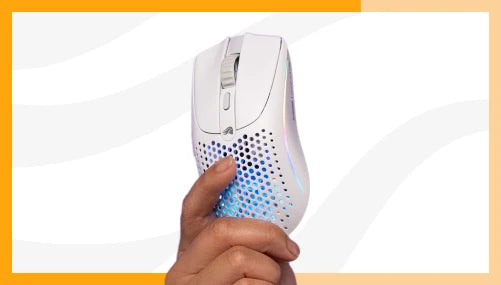
The Model O Eternal Wired is $39.99. The Model O3 Wireless is $159.99. That is a $120 gap. What you get for it: the BAMF 3.0 30K sensor, 8,000 Hz max wireless polling, tri-mode connectivity (2.4 GHz, Bluetooth, and wired USB-C), and the InfinitePlay swappable battery system - up to 71 hours per pack at 2.4 GHz, up to 130 hours at Bluetooth. The InfinitePlay system means you are never waiting for a charge - swap the pack in seconds and continue.
PC Gamer's review of the Model O3 Wireless notes its performance credentials at the wireless tier.
If wireless is not in the budget, the wired Model O Eternal Wired is not a compromise - it is a different decision with different trade-offs. It is 55g, USB-A, PixArt 3311 sensor, 1,000 Hz polling. PCGamesN covered the Model O Eternal on release for additional context.
Question 5: What Is Your Budget?
Budget is the last question, not the first. Answering grip style, hand size, game type, and wireless preference first tells you which tier you actually need - then budget tells you whether to reach for it now or wait.
Under $50. Wired only at this tier. What you get: a capable 1,000 Hz sensor, accurate optical tracking, and a lightweight body. The Model O Eternal Wired at $39.99 is 55g with the PixArt 3311 sensor, 80M rated switches, 6 remappable buttons, and 3 onboard memory profiles. PC Gamer reviewed the Model O Eternal as a strong entry-tier option. The primary trade-off at this tier is wireless - it is not available here.
$100 to $175. Wireless enters the picture. Sensors push into the 30K DPI range, polling rates reach 8,000 Hz, and battery systems remove charging as a concern. The Model O3 Wireless at $159.99 is the benchmark at this tier. For a broader look at the best-reviewed options across the market, the best gaming mouse guide covers the full competitive field.
The pattern that shows up across buyer feedback: players who anchor on budget first and skip the grip and hand size questions tend to buy twice. They land on the wrong shape at the right price, replace it with the same wrong shape at a higher price, and eventually find the correct shape at a price they could have started with. Five questions take three minutes. Buying twice takes time you did not plan to spend. (It also turns out that the right $40 mouse beats the wrong $150 one in every session you actually have to play.)
The 5-Question Checklist
Before purchasing any gaming mouse, confirm the following five points:
- Grip style confirmed - palm, claw, or fingertip. Use the desk hand test if unsure.
- Hand length measured - know your centimeter number before reading any spec sheet.
- Primary game genre identified - FPS players weight sensor accuracy at low DPI; MMO players weight button count.
- Wireless decision made - based on budget and cable-drag sensitivity, not on which option sounds better.
- Budget bracket established - after questions 1 to 4, not before.
If the answers point to a light symmetrical shape under $50 in a wired configuration: the Model O Eternal Wired. If the answers point to wireless, high polling rate, and a performance tier built to hold for several years: the Model O3 Wireless.
Browse the full Glorious mouse lineup.
FAQ
How do I figure out my grip style without trying a mouse in a store?
Rest your hand flat on a desk and relax it into the shape it would take around a mouse. If your palm stays in full contact with the surface - palm grip. If your palm heel stays low but your knuckles arch upward - claw grip. If your fingers fully extend with only the tips curving downward - fingertip grip. The test takes about 10 seconds and is more accurate than guessing from a photo of someone holding a mouse.
Do I really need a gaming mouse if I only play a few hours a week?
Not necessarily, but weight and shape matter at any usage level. A gaming mouse at the entry tier ($39.99 to $60) typically offers lighter weight, better switch longevity, and more deliberate ergonomic shaping than a comparably priced office mouse. Whether the performance specs matter at casual play volume is a different question - they probably do not. Whether the shape and weight matter for comfort over a long session, they do.
Does DPI matter for gaming?
DPI matters at low settings, where sensor accuracy and consistency count. Maximum DPI is largely a marketing number. Most competitive FPS players use 400 to 1,600 DPI regardless of the sensor ceiling. A mouse with a 50 to 12,000 DPI range - like the Model O Eternal Wired - covers everything a competitive player would realistically use.
What is the difference between the Model O Eternal Wired and the Model O3 Wireless?
The Model O Eternal Wired is a 55g wired mouse with the PixArt 3311 sensor at 1,000 Hz polling, priced at $39.99. The Model O3 Wireless is a 66g wireless mouse with the BAMF 3.0 30K sensor, 8,000 Hz max wireless polling, InfinitePlay swappable battery (up to 71 hrs per pack at 2.4 GHz), and tri-mode connectivity, priced at $159.99. The choice runs through Questions 4 and 5 of the framework.
How much should I spend on a gaming mouse?
Follow the five questions first. Grip style and hand size cost nothing to determine and eliminate most wrong choices before budget enters the calculation. Once those answers are in hand, most buyers land at the under-$50 tier (wired, entry sensor, well-suited shape) or the $100 to $175 tier (wireless, high polling rate, advanced sensor). There is no universally correct budget - only the budget appropriate to your answers.