


GMMK 3 vs Keychron Q: Which Custom Keyboard Platform Actually Wins?
Guides & Resources
Jul 09 2026
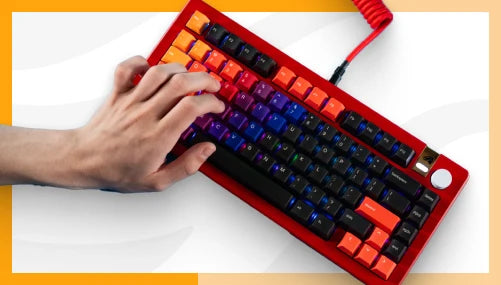
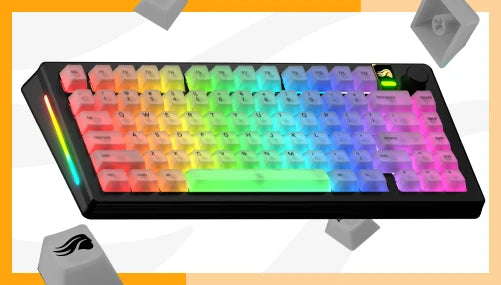
The Glorious GMMK 3 and the Keychron Q1 - the board most people mean when they say "Keychron Q" - both start under $100 as barebones kits, both use gasket mounting, and both take standard hot-swap switches. The Q1 ships as a full CNC aluminum case with QMK/VIA firmware working the moment you plug it in. The GMMK 3 ships in an ABS polymer case by default, but its Boardsmith configurator lets you swap the top case, bottom case, switch plate, and gasket material - at the cost of QMK/VIA support, which the GMMK 3 doesn't have. Different bets: one is finished on arrival, the other keeps changing.
The Headline Comparison
Both boards are sold barebones (case, plate, PCB - no switches or keycaps) and fully built. Here's the barebones spec breakdown, sourced from official product pages and independent testing.
| Spec | Glorious GMMK 3 (75% Barebones) | Keychron Q1 V2 (75% Barebone) |
|---|---|---|
| Price | $104.99 | $159.99 |
| Case material | ABS polymer (top + bottom) | Full CNC machined aluminum (6063, anodized) |
| Plate material | Aluminum (stock); polycarbonate, FR4, or brass via Boardsmith | Steel (stock) |
| Mount type | Modular Gasket System - 9 points of modularity, swappable gasket firmness | Double-Gasket Design - gaskets on plate plus silicone pads between top/bottom case |
| Hot-swap | 3-pin and 5-pin MX-compatible sockets | 3-pin and 5-pin MX-compatible sockets |
| Firmware | Glorious CORE only - no QMK, no VIA | QMK (open-source) with VIA support via Keychron Launcher |
| Polling rate | 1,000 Hz | 1,000 Hz |
| Layouts available | 65%, 75%, 100% (ANSI + ISO) | 75% only (other Q-series numbers cover 60% through 100%) |
| Colors | Black | Carbon Black, Silver Grey, Navy Blue, Shell White, and seasonal colorways |
| Warranty | 2-year | 1-year |
Both platforms hit the same starting price bracket for a hot-swap gasket-mount board, but they get there differently. Keychron builds the premium material (aluminum) into the base barebones price. Glorious builds in the upgrade path instead - the ABS shell is the starting point, and aluminum is something you add.
For the fully-built side of this comparison, the Glorious GMMK 3 75% Prebuilt ships with Glorious Fox Switches and GPBT Doubleshot Keycaps for $154.99, while the Keychron Q1 V2 Fully Assembled ships with pre-lubed Gateron G Pro switches and OSA-profile double-shot PBT keycaps for $189.99.
Customization Depth: Boardsmith vs. QMK/VIA
This is the section that actually decides which board fits you, because "customizable" means two different things here.
The GMMK 3's customization lives in hardware. Glorious's Boardsmith configurator lets you pick top case, bottom case, switch plate (aluminum, polycarbonate, FR4, or brass), gasket firmness, rotary knob, badge, cable, and switches - Glorious advertises over one billion possible combinations. GamesRadar+'s Tabitha Baker, who built a custom GMMK 3 Pro HE through the configurator, wrote: "Pairing a set of Glorious Lynx HE switches with an aluminum plate meant I could balance out the softer, marbly feel of the switch itself with a more middle-of-the-road hardness in the plate, while still allowing for a deep, rich sound profile. That's not something I've been able to achieve with any other gaming keyboard. You can even choose which gasket mount material you want - and swap them out later down the line." That's real, ongoing hardware modularity - you can keep changing the board for years without buying a new one.
The Keychron Q1's customization lives in firmware. It runs open-source QMK out of the box, with VIA support through Keychron's web-based Launcher (works in Chrome, Edge, or Opera, no software install required), per the official Q1 product page. That means full key remapping, macros, and layer switching from day one, plus the ability to flash custom QMK firmware if you want to go deeper. The GMMK 3 doesn't offer this: it runs exclusively on Glorious CORE, a proprietary app, with no QMK or VIA support on any GMMK 3 variant. If remapping without installing a branded app matters to you, that's a real point in the Q1's favor, and it's worth saying plainly rather than glossing over it.
So: the GMMK 3 wins on how much of the physical board you can change over its lifetime. The Q1 wins on software openness and out-of-box remapping. Neither claim cancels the other out - they're different kinds of "customizable," and which one matters depends on whether you'd rather swap a switch plate or swap a keymap.
For the mechanics of swapping switches on either board, the hot-swap keyboard guide covers what to check on any hot-swap PCB before you buy replacement switches.
Build Quality and Acoustic Profile
Case material is the most visible difference between these boards, and it's worth being precise about it: the standard GMMK 3 (not the GMMK 3 Pro) ships in an ABS polymer case, top and bottom. Stepping up to a full CNC aluminum shell on the GMMK 3 costs extra through Boardsmith - GamesRadar+ noted a metal bottom case option added $80 to the total build price. The Keychron Q1, by contrast, ships with a 6063 aluminum CNC-machined case.
That doesn't automatically make the Q1 sound better - it makes it heavier and more expensive to manufacture at stock. Tom's Hardware's Myles Goldman tested the Q1's Double-Gasket Design directly: "The Q1's gasket-mounted design is said to give the keyboard up to 2.5mm of flex, but I didn't notice much in the way of bend unless I pressed down like a gorilla on the keyboard… there wasn't any change in pitch when hitting keys on one area of the keyboard versus another. So the gasket-mount design is doing its job in that regard." He also flagged two things worth knowing before you buy: the Q1's top plate "scratches easily when swapping out switches," and despite sound-absorbing foam between the plate and PCB, "the Q1 makes a hollow sound when bottoming out."
The GMMK 3's Modular Gasket System takes a different approach to the same problem - instead of one fixed gasket design, you choose the gasket material at build time and can replace it later if you want a firmer or softer typing feel. GamesRadar+ rated the overall GMMK 3 platform's typing feel as a strength, listing "beautiful typing feel" as a pro in their review verdict.
Total Cost of Ownership: What a Barebones Build Actually Costs
The barebones price is never the real price, and this is where the "safe pick vs. deeper pick" framing from this piece's editorial angle earns its keep.
A Keychron Q1 barebones kit at $159.99 gets you the case, plate, and PCB - no switches, no keycaps. Keychron sells its own switches directly on the same page: a 110-count pack of Silk POM or Gateron KS-8 switches runs $24.99-$29.99, and keycap sets range from $19.99 for a basic transparent OSA set to $49.99 for a premium dye-sub PBT set. Budget roughly $50-$80 on top of the barebones price for a complete, comfortable-to-type-on build.
A GMMK 3 barebones kit at $104.99 (75%) gets you the same starting point - case, plate, PCB, no switches or keycaps. Glorious sells Fox, Lynx, Panda, and Raptor switches plus GPBT keycap sets separately. Switches range from $39.99 for a full set of Fox Switches, to $119.97 for the three boxes of Panda Switches needed to complete a 75% build. Glorious has a wide range of switches starting at $24.99 and going up to $79.99 for more complex keycap designs and premium materials.
As a directional comparison: the pre-built GMMK 3 75% (Fox switches, GPBT keycaps included) runs $154.99 against the barebones $104.99 - a $50 gap for switches and keycaps combined, which is in the same range as Keychron's parts pricing.
Either way, a barebones board is the start of the budget, not the end of it. If you're not planning to pick your own switches and keycaps, the pre-built versions of both boards - GMMK 3 75% Prebuilt at $154.99 or the Keychron Q1 V2 Fully Assembled at $189.99 (regular price) - are worth pricing against the barebones-plus-parts math before you commit to building. The mechanical keyboard buying guide breaks down what to budget for before your first build, board or otherwise.
Which One Should You Buy?
Pick the Keychron Q1 if: you want QMK/VIA remapping the moment you plug it in with no companion app, you want a full aluminum case at the barebones price point rather than as an upsell, or you're buying your first custom board and want the safer, more finished stock experience. Keychron's Q1 has held up as a reference point in this category since 2021 for a reason - it's not a bad default, it's a well-tested one.
Pick the GMMK 3 if: you plan to keep modifying the board over time - swapping plates, gaskets, and cases rather than buying a new keyboard when you want a different feel, and you're comfortable trading QMK/VIA for Glorious CORE. If customization and the ability to modify your board is your priority, the GMMK 3 is your pick hands down.
Neither board "wins" outright. The Q1 is the finished product you can remap from minute one. The GMMK 3 is the platform you keep rebuilding. If build-and-forget is the goal, the Q1 is the safer default. If you want a board that changes as your preferences do, the GMMK 3's Boardsmith path goes deeper - you'll just be doing that customization in hardware, not firmware.
FAQ
How does the Glorious GMMK 3 compare to the Keychron Q1 for custom keyboard builders? The GMMK 3 ships in an ABS polymer case and offers standalone accessories that let you swap the case, plate, and gasket material over time, but runs Glorious CORE only - no QMK or VIA. The Keychron Q1 ships in a full CNC aluminum case with QMK/VIA firmware support out of the box, but is a fixed design style and typing feel. Pick based on whether you value ongoing hardware modularity or day-one firmware openness.
Isn't Keychron the established enthusiast choice - why consider the GMMK 3? Keychron's Q1 has a longer track record in the gasket-mount category and won a Tom's Hardware Editor's Choice award. That track record is real. The GMMK 3 is a newer platform (launched September 2024) with a different pitch: instead of one fixed design, Boardsmith lets you reconfigure the board's case, plate, and gasket material as your preferences change, without buying a new keyboard. Whether that's worth the newer, less firmware-flexible platform depends on whether you see a keyboard as a one-time purchase or an ongoing project.
Is the GMMK 3's software stack actually mature enough to skip QMK/VIA? No GMMK 3 variant supports QMK or VIA - it runs exclusively on Glorious CORE. Glorious CORE covers RGB, macros, and switch/actuation settings on HE variants, but if open-firmware remapping without a branded app is a requirement, the Keychron Q1's QMK/VIA support is the more mature option today.
If I buy the GMMK 3 barebones, what's the real total cost? Add switches and keycaps on top of the $104.99 (75%) barebones price. Using the GMMK 3 Prebuilt's $154.99 price (which includes Fox switches and GPBT keycaps) as a reference point, budget roughly $50 for a comparable switch-and-keycap combination - in the same range as Keychron's own switch packs ($24.99-$29.99 for 110 switches) and keycap sets ($19.99-$49.99). Confirm current Glorious accessory pricing directly before finalizing a build budget.
Does the GMMK 3 come in more sizes than the Keychron Q1? Yes. The GMMK 3 platform spans 65%, 75%, and 100% layouts in both ANSI and ISO. The Keychron Q1 specifically is a 75% board only - Keychron's broader Q-series covers other sizes under different model numbers (Q0 through Q13), but "Keychron Q1" itself does not come in 65% or 100%.