


Gaming Mouse Buying Guide: How to Choose the Right Mouse for Your Grip and Game
Guides & Resources
May 28 2026
The right gaming mouse comes down to three things: your grip style, your hand size, and your game. Grip determines shape. Hand size determines fit. Game determines how you move. Get these three right and you will have filtered most of the market before looking at a single spec. Weight and sensor are the two performance variables that remain. DPI matters far less than the marketing suggests - and we will explain exactly why below.
Three Things That Decide Your Choice
Most buyers start by scanning spec sheets. Polling rate, sensor model, button count. These are real differences but they sit downstream of fit. A technically superior mouse that does not match your grip style will feel worse than an older mouse that does.
The sequence is grip first, hand size second, game type third. Filter by weight and sensor after that.
If you are mid-comparison and want to skip ahead, browse the full Glorious lineup by grip style and spec at www.gloriousgaming.com/pages/compare-glorious-mice.
Grip Style
There are three grip styles in widespread use. Most players use one naturally without naming it.
Palm Grip
Your entire hand rests on the mouse. The palm contacts the rear of the shell and the fingers lie flat on the buttons. Palm grip players need a mouse long enough to fill the hand and tall enough to support the rear of the palm without forcing the fingers into a curl.
Mice under 120mm in length tend to leave the palm unsupported in this grip. The Model O Eternal - Wired measures 128mm long, 67mm wide, and 38mm tall. That length sits within the palm grip range for medium hands and makes it a practical starting point for players establishing their grip.
Palm grip players tend to run lower sensitivities, which means wider arm movements and longer tracking distances per aim correction. Weight compounds over those distances. At 55g, the Model O Eternal - Wired keeps the arm load low across a full session.
Claw Grip
The palm rests at the rear of the mouse. The fingers arch over the primary buttons at the first knuckle, forming a claw shape at the contact point. Contact is at the fingertips and the first joint - not the full finger length.
Claw grip is common among FPS players who prioritize fast directional changes and short-burst aim corrections. A pronounced hump behind the buttons and moderate overall length work well for this grip. The shape matters more than the size. Claw grip is less sensitive to mouse length than palm grip because the palm's contact area is smaller and sits further back on the shell.
Fingertip Grip
Only the fingertips contact the mouse. No palm contact. The player moves the mouse with fingertip precision and drives direction from the wrist or elbow.
This grip benefits the most from low weight. The fingertips carry all the moving load, so every gram the player does not hold is effort saved across a session. It also demands more precision in shape fit at the front third of the mouse, where all the contact happens.
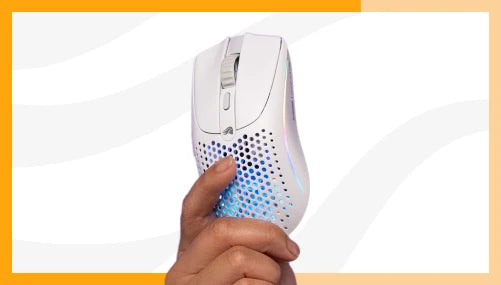
The Model O3 Wireless weighs 59g without its battery pack installed, 66g with the 200mAh pack. At 59g it falls within the range fingertip grip players look for at a competitive price point. The body tapers from 65.73mm at the base to 60.73mm at the top - a narrower front contact surface that suits the smaller fingertip contact patch.
How to identify your grip: Place your hand on your current mouse in your normal playing position. If your palm rests on the rear shell, that is palm grip. If only your fingertips touch the body, that is fingertip grip. If your palm contacts the rear but your fingers arch at the knuckle rather than lying flat on the buttons, that is claw.
Hand Size: Measure Before You Buy
Mouse fit is a measurement problem. A mouse too small for a large hand forces an unnatural curl. A mouse too large for a small hand limits fine control at the fingertips. Most players who feel fatigued after long sessions are using a mouse that does not fit their hand - not a mouse that is technically inferior.
Measure your hand before buying. Place it flat on a surface with fingers together. Measure from the base of the palm crease to the tip of the middle finger. That is your hand length. Then measure across the four knuckles at their widest point. That is your hand width.
Rough fit ranges by measurement:
- Small: under 170mm length / under 80mm width
- Medium: 170-190mm length / 80-95mm width
- Large: over 190mm length / over 95mm width
The Model O Eternal - Wired at 128mm × 67mm maps well to medium hands in palm and claw grip. The Model O3 Wireless runs 127.5mm long with a width that graduates from 65.73mm at the base to 60.73mm at the top. The taper gives claw and fingertip grip players a narrower front contact surface than the rear, which helps precision at the fingertips without sacrificing rear stability.
For a deeper comparison of symmetrical versus ergonomic shapes and how each suits different hand geometries, see the ergonomic vs. ambidextrous mouse guide.
Game Type
Genre affects mouse requirements in two practical ways: the sensitivity range you use and the movement pattern your game demands.
FPS and Tactical Shooters
FPS players typically operate at low-to-mid sensitivity settings. The priority is precise crosshair placement over cursor speed. Wide arm sweeps replace quick wrist flicks. Weight matters more here than in any other genre because every gram accumulates across hundreds of aim corrections per game.
The Model O Eternal - Wired at 55g and $39.99 covers this use case at the accessible end of the market. PC Gamer noted its weight as a core strength in their review of the mouse.
MOBA and Strategy
These genres involve fewer sudden direction changes and more deliberate cursor positioning. Sensor tracking accuracy at moderate DPI settings matters more than extreme polling rate. Weight is a factor over long sessions but less acute than in FPS play.
General Gaming and Productivity
For players who use their mouse across gaming, work, and browsing over extended time at the desk, wireless connectivity becomes a meaningful factor. Wireless removes cable drag and allows repositioning without cable management. The Model O3 Wireless connects via 2.4 GHz wireless, Bluetooth, or USB-C wired, covering all three connection modes in one device. For a full comparison of wireless options at different price points, see the best wireless gaming mouse guide.
The Two Specs That Actually Matter
Weight
Weight is the most underrated specification in gaming mice. Every gram the player holds, they also decelerate and re-accelerate on every movement. At high sensitivity settings the difference between 55g and 80g is smaller. At low sensitivity FPS settings with wide arm sweeps, it builds across a session. The Model O Eternal - Wired weighs 55g ±4g. The Model O3 Wireless weighs 66g with the 200mAh battery pack installed and 59g without it.
RTINGS tested the Model O3 Wireless and published full tracking accuracy and click latency data. PC Gamer also reviewed the Model O3 Wireless in a hands-on piece.
DPI: What the Number Actually Means
DPI stands for dots per inch. It measures how far the cursor moves on screen per inch of physical mouse movement. Higher DPI produces faster cursor travel at the same physical speed.
Most competitive players set their mouse between 400 and 1,600 DPI. The difference between a 12,000 DPI sensor ceiling and a 30,000 DPI ceiling is irrelevant at those settings. What matters is sensor accuracy at the DPI a player actually uses - not the maximum the sensor can reach.
The Model O Eternal - Wired runs an optical sensor with a 50 to 12,000 DPI range. The Model O3 Wireless runs a BAMF 3.0 30K sensor with a 50 to 30,000 DPI range. Both sensors perform accurately well below their ceiling values.
A higher DPI ceiling does not produce better aim. A sensor that tracks accurately at 800 DPI is more useful than a sensor with a 30,000 DPI ceiling that drifts at the low end. Sensor selection is about accuracy at your working range - not the number on the box.
Polling Rate
Polling rate is how often the mouse reports its position to the computer. 1,000 Hz means 1,000 position reports per second - one every millisecond. 8,000 Hz means 8,000 reports per second.
The Model O Eternal - Wired polls at 1,000 Hz. The Model O3 Wireless polls at up to 8,000 Hz wirelessly, with a minimum of 125 Hz.
The measurable difference between 1,000 Hz and 8,000 Hz is real in controlled testing. For most gaming use cases outside of professional play, both polling rates are accurate at the movement speeds human wrists and arms produce.
Wired vs. Wireless
The latency gap between wired and wireless has closed. The Model O3 Wireless polls at up to 8,000 Hz wirelessly - faster in report rate than many wired mice at 1,000 Hz. The decision is no longer about performance. It is about use case and budget.
Wired: No charging, no battery weight, no wireless receiver to manage. The Model O Eternal - Wired at $39.99 is the performance-per-dollar argument. Mechanical switches rated to 80 million clicks, 1,000 Hz polling, 55g. For players who want zero wireless variables in their setup, this is the answer.
Wireless: Clean desk, freedom of movement, and multi-device support. The Model O3 Wireless connects via 2.4 GHz, Bluetooth, and USB-C wired at $159.99. Battery life is up to 71 hours per 200mAh pack at 2.4 GHz. The InfinitePlay System removes the charging cycle from the workflow entirely. For players using their mouse across a gaming setup and a work desk, tri-mode connectivity covers every scenario.
For lightweight wireless options at different price points, see the best wireless gaming mouse guide.
Our Picks by Grip Type
| Grip | Hand Size | Use Case | Recommended Mouse | Price |
|---|---|---|---|---|
| Palm | Medium | FPS, general gaming | Model O Eternal - Wired | $39.99 |
| Palm / Claw | Medium-Large | Competitive FPS, long sessions | Model O3 Wireless | $159.99 |
| Claw / Fingertip | Medium | Competitive FPS, wireless | Model O3 Wireless | $159.99 |
| Fingertip | Small-Medium | Tactical shooters, precision play | Model O3 Wireless | $159.99 |
Palm grip, medium hands: The Model O Eternal - Wired at 55g and 128mm fills the palm grip footprint for medium hands. At $39.99 it is the accessible entry point with a verified sensor and no performance compromises at that price.
Claw or fingertip grip, competitive FPS: The Model O3 Wireless at 66g with battery, with a tapered body narrowing toward the front contact surface, suits the shorter contact patch of claw and fingertip grip. The BAMF 3.0 30K sensor and 8,000 Hz wireless polling cover competitive demands without a wired connection.
Wireless, extended sessions: The Model O3 Wireless at up to 71 hours battery life per pack at 2.4 GHz means most players will not run flat during a session. The InfinitePlay battery swap removes the one remaining failure mode: running flat at the wrong moment.
Frequently Asked Questions
How do I know what grip style I use?
Place your hand on your current mouse in your normal playing position. If your palm rests flat on the rear of the shell, that is palm grip. If only your fingertips touch the body and your palm lifts clear, that is fingertip grip. If your palm contacts the rear of the shell but your fingers arch at the knuckle rather than lying flat, that is claw grip. Most players settle into one naturally without trying.
Does DPI actually matter?
At settings below 3,200 DPI, the sensor ceiling is irrelevant for the majority of players. What matters is accuracy at the DPI you use - not the maximum the sensor can reach. The optical sensor in the Model O Eternal - Wired and the BAMF 3.0 30K in the Model O3 Wireless both track accurately within the range most players set. The difference between a 12,000 DPI ceiling and a 30,000 DPI ceiling does not affect performance at 800 or 1,600 DPI.
How do I measure my hand for a gaming mouse?
Lay your hand flat on a surface with fingers together. Measure from the base of the palm crease to the tip of the middle finger for your hand length. Measure across the four knuckles at their widest point for your hand width. Cross those measurements against the fit ranges in the Hand Size section above to find your category.
Is wireless gaming mouse latency still a problem in 2026?
At 2.4 GHz with high polling rates, wireless latency is no longer a performance disadvantage over wired at standard polling rates. The Model O3 Wireless polls at up to 8,000 Hz wirelessly. RTINGS' independent testing documents the tracking and click latency performance. Bluetooth has higher latency than 2.4 GHz and is best suited to productivity and casual use.
What is the difference between the Model O Eternal - Wired and the Model O3 Wireless?
The Model O Eternal - Wired is a 55g wired mouse at $39.99 with an optical sensor polling at 1,000 Hz and 80 million rated mechanical switches. The Model O3 Wireless is a 59-66g wireless mouse at $159.99 with a BAMF 3.0 30K sensor polling at up to 8,000 Hz wirelessly, 130 million rated optical switches, and the InfinitePlay swappable battery system with up to 71 hours battery life per pack at 2.4 GHz. The right choice depends on budget, wired versus wireless preference, and how much the polling rate ceiling matters for your use case.
What grip style is best for FPS games?
There is no single grip style that is objectively best for FPS. Palm grip suits players who use low sensitivity and wide arm sweeps. Claw grip suits players who want fast directional changes with shorter wrist movements. Fingertip grip suits players who run high sensitivity settings and move the mouse with fingertip precision. Performance across all three depends more on how well the mouse shape fits the grip than on the grip style itself.