


Barebones Keyboard vs. Prebuilt: Which One Actually Makes Sense for You?
Guides & Resources
Jul 23 2026
A barebones keyboard ships with no switches or keycaps installed. A prebuilt keyboard arrives ready to type on. The GMMK 3 65% Barebones costs $99.99 and includes hot-swap sockets only. The GMMK 3 65% Prebuilt costs $139.99 and includes installed Glorious Fox Switches and GPBT Doubleshot Keycaps. Buying barebones plus the parts to finish it separately usually costs more than the prebuilt price, not less.
What "Barebones" Actually Buys You
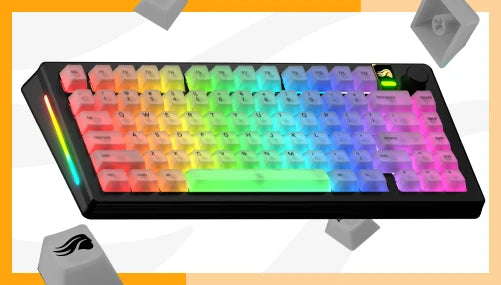
Barebones means the board, the case, the plate, and the hot-swap sockets. Nothing else. The GMMK 3 65% Barebones ships at $99.99, with the Modular Gasket System (9 points of modularity), per-key RGB with sidelights and badge lighting, a detachable USB-C cable, and support for 3-pin and 5-pin MX-compatible switches. What it does not ship with: switches and keycaps, which are necessary for typing on the board.
That distinction matters because everything people associate with "premium feel" on a mechanical keyboard, the gasket mount, the modularity, the RGB, is identical whether you buy Barebones or Prebuilt. The GMMK 3 platform does not hold anything back for the pricier configuration. What you're actually choosing between is not build quality. It's whether you want to install the last two components yourself.
The GMMK 3 Barebones ships in black only. If a white board matters to you, that decision gets made for you. Worth knowing before you talk yourself into a build for the color options alone.
The $40 Gap: What Prebuilt Adds
| Spec | GMMK 3 65% Barebones | GMMK 3 65% Prebuilt |
|---|---|---|
| Price | $99.99 | $139.99 |
| Switches | None included | Glorious Fox Switches (linear, 45g, pre-lubed) |
| Keycaps | None included | GPBT Doubleshot Keycaps |
| Colors | Black | Black, White |
| Gasket mount | Yes | Yes |
| RGB | Per-key, sidelights, badge | Per-key, sidelights, badge |
| Connectivity | USB-C, detachable | USB-C, detachable |
| Hot-swap | 3-pin and 5-pin MX-compatible | 3-pin and 5-pin MX-compatible |
| Warranty | 2 years | 2 years |
$40 separates the two configurations, and that $40 buys exactly two things: switches and keycaps, both already installed. Nothing else changes. The gasket mount, the modularity, the lighting, the connector, the warranty term, all of it carries over regardless of which one you buy.
Does Barebones Actually Save You Money?
Building your own from the GMMK 3 65% Barebones: $99.99 for the board, plus a box of Glorious Fox Standard switches at $34.99 (one box covers a 65% layout), plus a GPBT Keycaps set at $49.99, adds up to $184.97.
The Prebuilt, with the same Fox Switches and comparable GPBT Doubleshot Keycaps already installed, costs $139.99.
Building it yourself costs about $45 more than buying it finished, at published MSRP for the closest matching parts. That's the opposite of the assumption most first-time buyers walk in with. Barebones isn't the budget option here. It's the customization option, and customization has a price.
Where barebones actually does save money: you already own switches or keycaps from a previous board and you're reusing them. You want a switch Glorious doesn't bundle into any Prebuilt config, Lynx or Panda instead of Fox, for instance, and you're buying that switch anyway. Or you're building more than one board and buying switches by the box spreads that $34.99 across builds instead of paying for pre-installed switches on every unit. Outside of those cases, Prebuilt is the cheaper path to a finished keyboard, not the more expensive one.
What a First Build Actually Requires
Installing switches and keycaps on the GMMK 3 Barebones is not soldering. Each socket holds the switch mechanically, press it in until it seats, pull it out with a switch puller if you need to redo it. The full mechanics of the process, tools included, are covered step by step in the hot-swap keyboard explained guide.
What that guide doesn't cover, because it's specific to a from-scratch build: you're seating every switch and every keycap on the board, not swapping a handful later. On a 65% layout that's roughly 68 switches and 68 keycaps, one at a time, checking each key registers before moving to the next. It's a slower first hour than opening a Prebuilt box, and it's also the reason people who build their own boards talk about the process like it's part of the appeal, not a chore to get through.
None of this requires prior keyboard-building experience. It does require patience for a repetitive task and a willingness to catch your own mistakes before they compound across 68 keys. A first barebones build won't make the keyboard feel like a custom shop build, and it shouldn't be sold as one. What it will do is put exactly the switches and keycaps you chose into a board you assembled yourself.
Answering the Objections
"I've never built a keyboard. Is barebones too hard for a first board?" The mechanical part isn't hard: press switches in, snap keycaps on, no tools beyond a switch puller. The time investment is the real cost, not the skill floor. If a weekend project sounds appealing, barebones delivers one. If you want to type on the keyboard the day it arrives, Prebuilt removes that step entirely without giving up anything else the platform offers.
"Will I actually save money, or end up spending more?" Based on published MSRPs for the closest matching parts, building from Barebones costs more than buying Prebuilt, not less, unless you're reusing parts you already own or building multiple boards from bulk-purchased switches.
"Can I get the same feel from a Prebuilt if I don't want to build?" Yes. The Prebuilt ships with Glorious Fox Switches, linear, 45g actuation, factory pre-lubed, on the identical gasket-mounted chassis as the Barebones.The mount and the modularity aren't a Barebones-only feature. You get the platform's full feel out of the box.
For a broader framework on choosing layout, switch type, and price tier before you land on either configuration, the mechanical keyboard buying guide covers the decision from the beginning.
Which One Should You Buy?
Pick GMMK 3 Barebones if: you already own switches or keycaps you want to reuse, you want a specific switch Glorious doesn't bundle into a Prebuilt config, you're building more than one board and buying parts in bulk, or the build itself is part of why you want a mechanical keyboard.
Pick GMMK 3 Prebuilt if: you want a finished keyboard the day it arrives, you want the White colorway (Barebones is Black only), or you've done the math above and $139.99 for parts-plus-assembly beats $184.97 for parts alone.
Neither configuration is the "serious builder" option and neither is the "beginner" option. They're the same platform sold at two different points in the assembly process, priced accordingly.
FAQ
What is a barebones keyboard? A barebones keyboard ships with the case, plate, PCB, and hot-swap sockets, but no switches or keycaps installed. The GMMK 3 65% Barebones costs $99.99 and includes the same Modular Gasket System and per-key RGB as the Prebuilt version, but requires switches and keycaps purchased and installed separately before it can be used.
Is a barebones keyboard cheaper than a prebuilt one? Not usually, once you buy the parts. The GMMK 3 65% Barebones at $99.99 plus a box of Glorious Fox Switches ($34.99) plus a GPBT Keycaps set ($49.99) totals $184.97, compared to $139.99 for the Prebuilt with equivalent parts already installed. Barebones saves money mainly when you already own switches or keycaps, or buy parts in bulk across multiple builds.
Do I need experience to build a barebones keyboard? No prior keyboard-building experience is required. Installing switches and keycaps involves no soldering: switches press into hot-swap sockets and keycaps snap onto switch stems. The main investment is time and patience, since a 65% layout means seating roughly 68 switches and 68 keycaps individually before the board is usable.
What's included with the GMMK 3 65% Prebuilt? The GMMK 3 65% Prebuilt costs $139.99 and includes Glorious Fox Switches (linear, 45g actuation, factory pre-lubed) and GPBT Doubleshot Keycaps already installed, alongside the Modular Gasket System, per-key RGB with sidelights and badge lighting, and a detachable USB-C cable.
Should I buy barebones or prebuilt? Buy Prebuilt if you want a finished keyboard immediately or want the White colorway, which is not offered on Barebones. Buy Barebones if you already own compatible switches or keycaps, want a specific switch Glorious doesn't bundle into any Prebuilt configuration, or the build process itself is part of the appeal.