


Ergonomic vs Ambidextrous Gaming Mouse: Which Shape Is Right for You?
Guides & Resources
May 13 2026
Ergonomic gaming mice are shaped for right-handed palm grip, with a raised right-side shell and contoured rear hump. Ambidextrous mice use a symmetric profile that works for all three grip styles and both hands. Your grip style and dominant hand are the deciding variables. Glorious makes both shapes across its mouse lineup.
What Makes a Mouse Ergonomic
An ergonomic gaming mouse is designed for right handed gamers. The shell rises on the right side to support the palm. The thumb rests in a natural lateral groove. The rear hump follows the arch of a right-handed palm grip.
This design is built for extended right-handed palm grip use. The shell supports the hand's full contact area from heel to fingertip. A right-handed palm grip player does not need to hold the mouse in place, the shape does that work.
Ergonomic shaping has two constraints: it works only for right-handed players and it is optimized for palm grip. Claw and fingertip grip players do not use the palm support, and the high rear hump can interfere with a floating hand position.
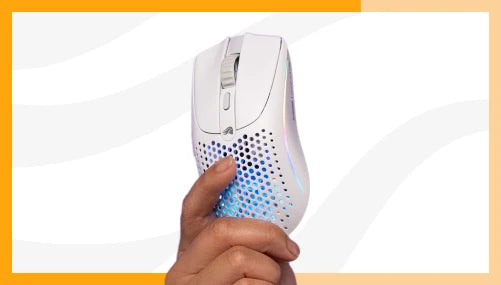
The Model D3 Wireless Mouse is Glorious's ergonomic option, available in Black and White. It also comes in a Wired version that is only available Black.
What Makes a Mouse Ambidextrous
Ambidextrous mice are symmetric from left to right. No palm shelf. No raised side. Button layout mirrors identically on both sides.
That symmetry serves four additional groups: left-handed players, players who switch between hands, claw grip players who prefer a lower rear profile, and fingertip grip players who lift the palm entirely. For all four, a symmetric shell works where an ergonomic shape does not.
A flat symmetric rear gives the fingertip grip player direct edge contact without a high hump forcing the hand upward. It gives the left-handed player a shape oriented correctly for their grip.
The Model O Eternal is an affordable ambidextrous option in the Glorious lineup. For higher technical specification options, check out Model O3 Wired and Wireless mice from Glorious.
The Three Grip Styles and the Shape They Suit
Grip style is the primary selection variable in this comparison.
Palm grip. The full hand rests on the mouse from heel to fingertip. Contact covers the entire shell surface. Right-handed palm grip players benefit from ergonomic shaping. The rear hump and right-side elevation support that full contact naturally. A flat ambidextrous shell leaves the palm without structural support.
Claw grip. The palm contacts the rear of the shell, but the fingers arch upward and touch the buttons only at the tip. Claw grip is compatible with both shapes. Ergonomic mice work if the sizing fits the hand correctly. Ambidextrous mice work when the rear profile provides enough support for the palm base.
Fingertip grip. Only the fingertips touch the mouse. The palm lifts off the shell entirely. The mouse moves from the wrist and fingers rather than the whole arm. Fingertip grip players favor the lower-profile flat rear of an ambidextrous mouse. A high ergonomic hump pushes the hand into an elevated angle that interferes with this grip.
To identify your grip: set your hand on a flat surface in a relaxed position and observe where contact falls. That resting pattern maps directly to your grip style.
Hand Orientation and Left-Handed Players
Ergonomic mice shaped for the right hand are not usable with comfort by left-handed players. The palm shelf, thumb groove, and button weighting are all oriented for right-hand use. Gripping one in the left hand produces an unnatural wrist angle and does not engage the ergonomic contours as intended.
Left-handed players should use an ambidextrous mouse. The symmetric shell works with either hand and the mirrored button layout functions identically from the left side.
Shape and Long Session Use
Gamers log many long gaming sessions per week, and at multiple hours per session, that time spent gripping your mouse adds up when it comes to wrist and hand strain.
For right-handed palm grip players in extended sessions, ergonomic shaping is designed to support the hand's natural position over time. The shell follows the hand rather than requiring the hand to conform to the shell.
For players whose grip shifts during a session, an ambidextrous shape accommodates that variation. A symmetric profile does not commit the hand to a single position.
Which Shape Should You Buy
|
Your Situation |
Shape |
|
Right-handed, palm grip |
Ergonomic |
|
Fingertip grip, any hand |
Ambidextrous |
|
Left-handed, any grip |
Ambidextrous |
|
Claw grip |
Either — size fit matters as much as shape |
|
Unsure of grip style |
Start with ambidextrous |
If you are uncertain of your grip style, ambidextrous is the lower-risk starting point. It works for more grip styles and does not restrict hand orientation. An ergonomic mouse is the right call once you have confirmed right-handed palm or claw grip.
For spec comparisons, dimensions, and pricing across both shapes, check out our Glorious Mouse Comparison tool. For a broader gaming mouse exploration covering sensor, polling rate, and connectivity, see our Gaming Mouse Basics guide.
Find your grip style, then browse the full Glorious mouse lineup at www.gloriousgaming.com/collections/mice.
FAQ
What is the difference between an ergonomic and ambidextrous gaming mouse?
Ergonomic gaming mice are shaped for right-handed palm grip, with a raised right-side shell and thumb rest. Ambidextrous mice use a symmetric profile that works for all three grip styles and both hands. The key difference is hand orientation and grip style compatibility. Ergonomic suits right-handed palm grip. Ambidextrous suits fingertip grip, left-handed players, and players who switch hands.
What grip style suits an ergonomic gaming mouse?
Ergonomic gaming mice are designed for right-handed palm grip, where the full hand rests on the shell from heel to fingertip. The raised rear hump and right-side elevation support that contact area. Claw grip is compatible when the mouse is sized correctly. Fingertip grip players, who lift the palm entirely, typically prefer the lower profile of an ambidextrous design.
Can left-handed players use ergonomic gaming mice?
Left-handed players cannot use right-hand ergonomic mice comfortably. The palm shelf, thumb rest, and button weighting are shaped for the right hand. Using one in the left hand produces an unnatural wrist angle and does not engage the ergonomic contours as intended. Left-handed players should use an ambidextrous mouse with a symmetric shell and mirrored button layout.
Does mouse shape affect gaming performance?
Mouse shape affects control consistency. A shape that does not fit the hand introduces micro-adjustments and grip tension across a session. The sensor and polling rate determine hardware performance. Shape determines whether the hand can deliver that performance consistently over time.
How do I figure out my grip style?
Place your hand on a flat surface in a relaxed position. Full palm contact from heel to fingertips is palm grip. Palm touching the rear with arched elevated fingers is claw grip. Only fingertip contact with the palm lifted is fingertip grip. Most Glorious mouse product pages specify which grip styles the shape is optimized for.